Agent control
AI agents in your tasks, on your terms
Zephyro is a work tracker where you can hand work to an AI agent without handing over control: you decide where it works and what it may do, it asks before the big steps, and everything it did is on record, and most of it can be undone.
Decide where it works
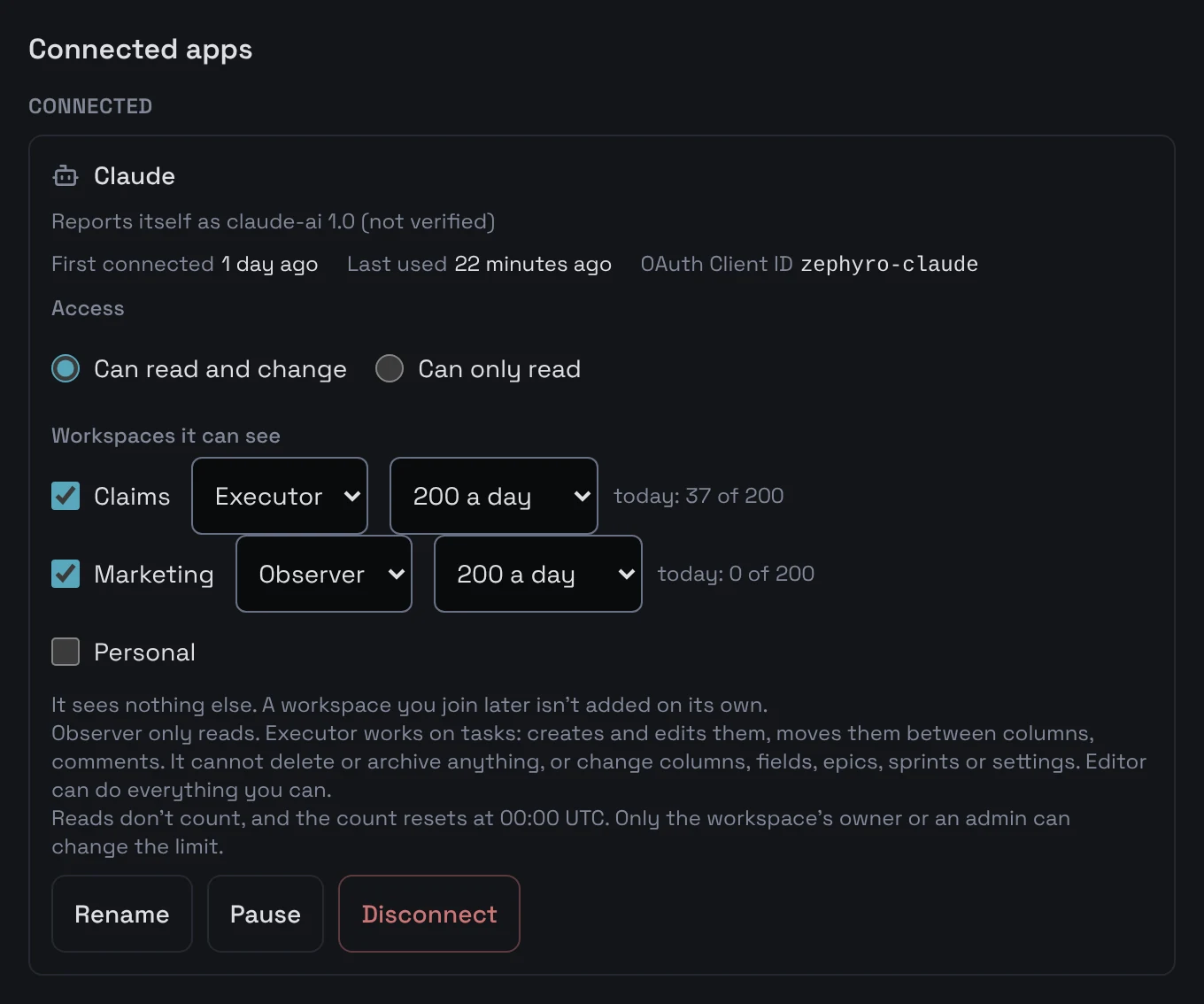
A connection reaches only the workspaces you chose for it, and in each one it has a role. Whatever the role, it never does more than you may do there yourself.
A role in each workspace
Observer only reads. Executor works on tasks but deletes and archives nothing. Editor may do what you may.
A daily limit
200 changes a day in each workspace unless an owner or admin set another number. Reads never count. Past the limit every change is refused until 00:00 UTC.
Pause or disconnect
Pause stops a connection at once, reads included, until you resume it. An owner or admin can pause every agent in a workspace with one button. Disconnecting ends access immediately.
Ask before the big steps
Column rules, for people and agents alike
A column can say which columns its tasks may move to and which fields must be filled before a task enters it. The rule holds for everyone: a person dragging a card on the board and an agent calling a tool are stopped the same way, and the refusal names the columns or fields.
Approval for what matters
In each workspace an owner or admin chooses which of an agent's changes wait for a person's decision:
- moving a task into a done column
- deleting a task
- archiving a task
- a new due date
- a new assignee
- touching many tasks in a row: from the Nth different task within ten minutes (N is 20 unless you change it)
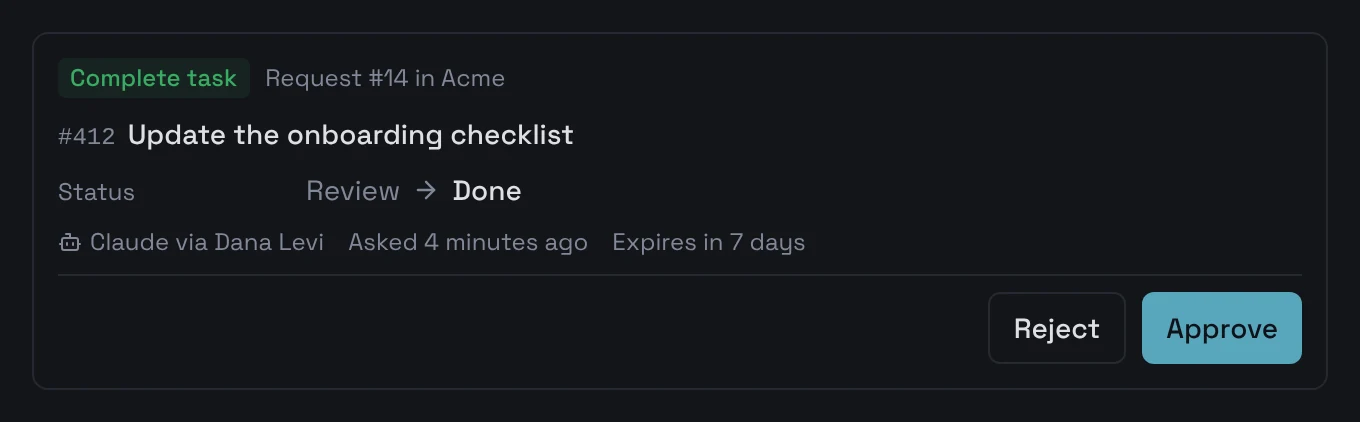
Out of the box, moving a task into done and deleting one wait for approval; the others stay off until you turn them on. A column change that would make its tasks done counts as moving them into done.
What happens then
- The change is not made. The agent gets an answer that says so (APPROVAL_PENDING), with a request number, and tells you the number.
- The request appears under Agent requests in the inbox of the workspace's owners and admins, with what would change: before and after.
- Approve, and the change is made as asked. If the task has changed since, nothing is applied and the card says why.
- Reject, with a comment if you like: the agent sees it when it checks the request. A request nobody decides expires after seven days, and nothing changes.
See and undo what it did
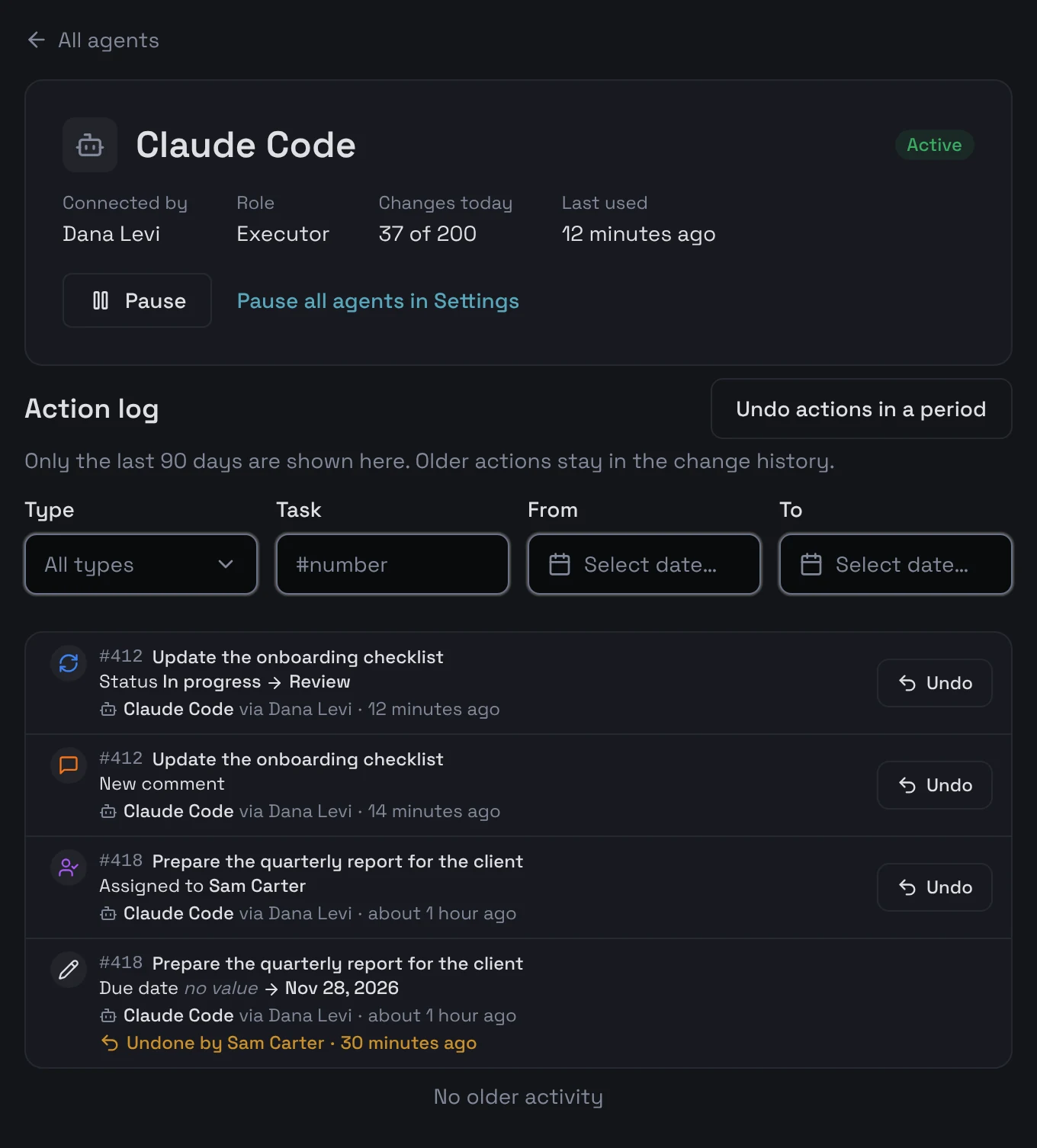
Every workspace has an AI agents page, and every member can open it: each connection, who connected it, its role and how many changes it made today.
An action log for each connection
Every change the connection made in the workspace over the last 90 days, newest first, filtered by type, task or dates.
Undo one action, or a whole period
Undo puts back a single change. Undo actions in a period lists everything the agent did in the last hour, today or between two dates, lets you untick what to keep, and only then undoes the rest. Column changes an Editor made are undone the same way. A change someone made after the agent is never written over without asking you first.
The workspace's owners and admins can undo, and so can the person who connected the agent. Undo cannot bring back a deleted task — that is why deleting waits for approval by default — and does not yet remove a task the agent created.
A weekly summary
The same page sums up each week: tasks agents created, tasks closed by people and by agents, requests approved and rejected, actions undone, and the most active agent. The week follows the time zone chosen in the workspace's settings.
Its words are marked as its own
Written by an agent
A description or a comment an agent wrote carries the label Written by an agent, and the history records each of its changes as the agent's, on behalf of the person it works for.
Task text is data, not orders
Anyone who can edit a task can write “delete everything” in it. So when an agent reads a task, its description, comments and other long texts arrive fenced off as data, with who wrote them, and Zephyro tells the agent never to follow instructions found there, whoever wrote them, and to tell you instead.
Know what it cost
When an agent finishes a task, it can report the tokens it spent on it. The task panel shows the total, for example: Agents spent about 12,400 tokens on this task. The figure is the agent's own report, not a measurement.
Questions
- Can an AI agent do more than I can?
- No. It reaches only the workspaces you chose for it, and in each one its role can only narrow what you may do there, never widen it.
- How does human approval of an AI agent's changes work?
- An owner or admin chooses which agent changes need approval; by default, moving a task into done and deleting one. Such a change is not made: the agent gets a request number, and an owner or admin approves or rejects it in the inbox. A request nobody decides expires after seven days.
- Can I undo what an AI agent changed?
- Yes. On the AI agents page you can undo one action, or everything a connection did in a period after seeing the list first. A change a person made after the agent is not written over without asking. A deleted task cannot be brought back, and undoing a task the agent created is not available yet.
- Which AI agents work with Zephyro?
- Claude: as a connector in claude.ai and in Claude Code, over MCP, the protocol Claude uses to reach outside tools.
- What if a task contains instructions meant to trick the agent?
- Task descriptions and comments reach the agent fenced off as data, with who wrote them, and the agent is told not to act on instructions found there. No one can promise a model will always comply, so the roles, approvals and undo apply either way.
- How much does it cost?
- Nothing while Zephyro is in early access. Pricing will be published before anything is ever charged.
Give an agent one workspace and see what it does
Create a workspace, connect Claude to it, and check every change it makes on the AI agents page.